One moment, two platforms
A clip is usually exported twice — one file for YouTube Shorts, one for TikTok, each with its own caption. ClipJet takes both and keeps them in a single queue.
 ClipJet
ClipJet is a Windows desktop app for a single creator. You pick a finished vertical clip, write the caption, choose who can see it and when it should go out — ClipJet publishes it to your own TikTok and YouTube Shorts accounts at that moment.
Runs entirely on your own computer. No cloud service, no other users, no one else's content.
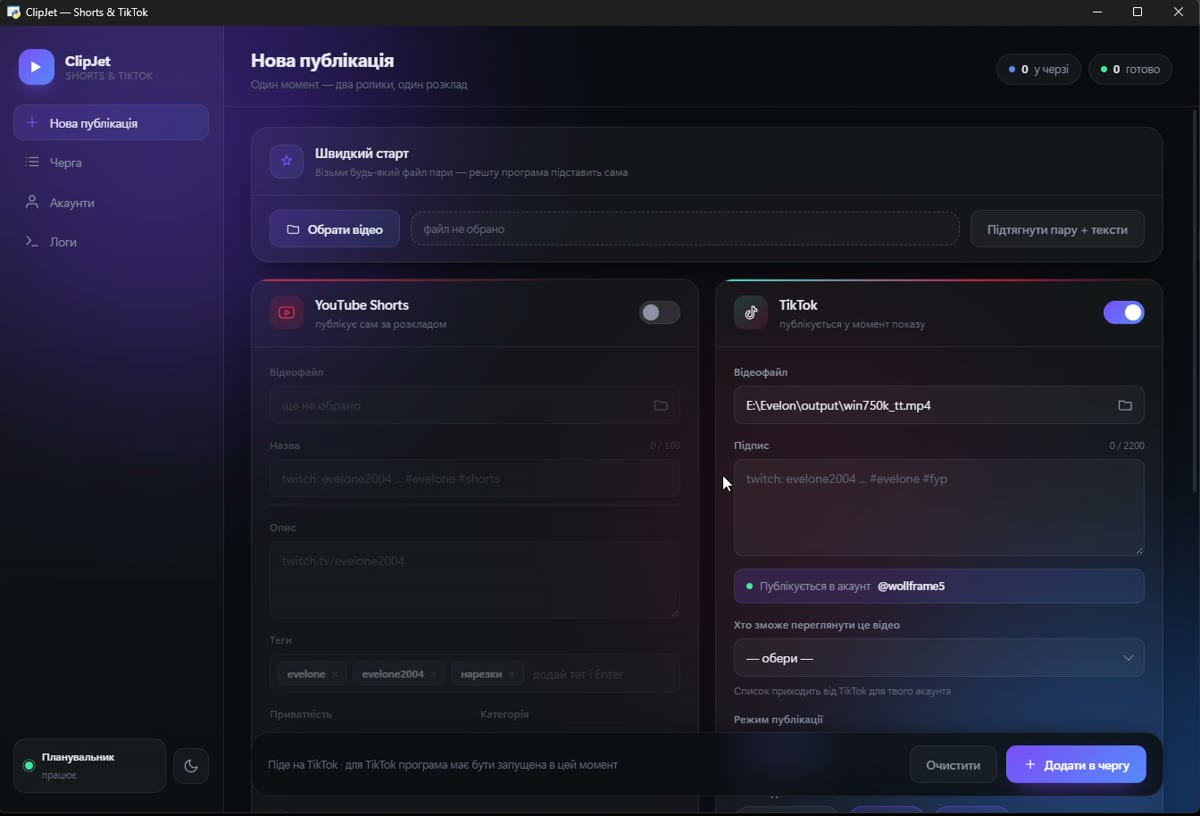
A clip is usually exported twice — one file for YouTube Shorts, one for TikTok, each with its own caption. ClipJet takes both and keeps them in a single queue.
Nothing is published on its own initiative. A post exists only because you created it: your file, your caption, your privacy level, your time.
Before every post the app asks TikTok which privacy levels your account allows and shows only those. Comment, duet and stitch settings are set per clip.
Videos never pass through a server of ours — there is no server. Access tokens stay in a file on your machine and are used only to talk to the official platform APIs.
| YouTube Shorts | TikTok | |
|---|---|---|
| Scheduling | Native — the clip is uploaded privately with a publish time | No scheduling in the API, so the app posts at the chosen moment |
| PC must be on | No, only while uploading | Yes, at the moment of posting |
| Daily ceiling | About six uploads per day on the default API quota | The limits of your own account |
Those differences are not hidden behind a single "publish" button — the app tells you which of the two is about to happen before you add anything to the queue.